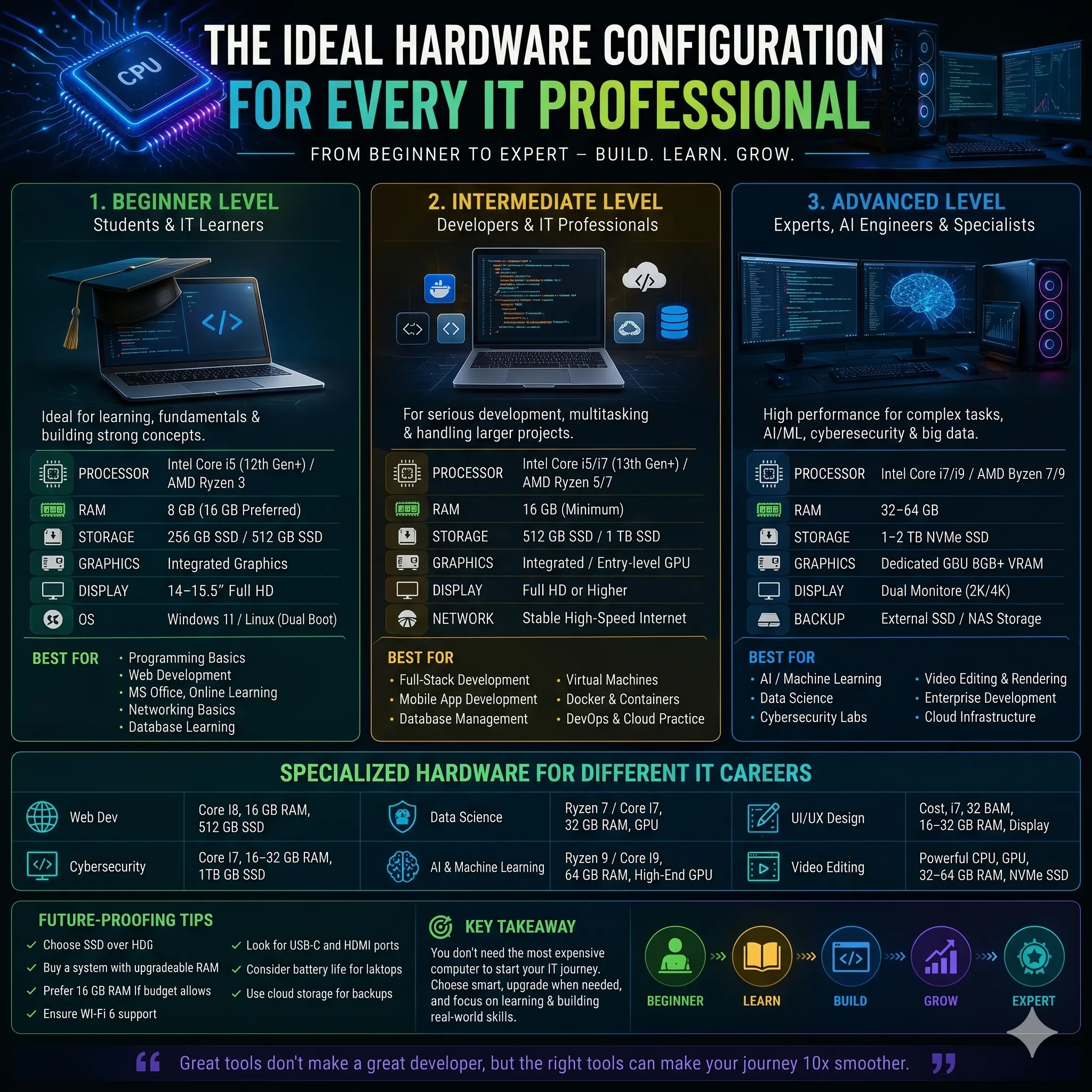
A computer is one of the most important investments for anyone pursuing a career in Information Technology. Whether you are learning programming, building websites, managing cloud infrastructure, designing user interfaces, analyzing data, or developing artificial intelligence applications, your computer becomes your primary working environment.
Many beginners assume they need the most expensive laptop or desktop to start an IT career. In reality, the best computer depends on the type of work you plan to do, your current skill level, and how your requirements are likely to grow over time.
A thoughtfully chosen system can improve productivity, reduce frustration, and provide enough performance to support your learning and professional development for several years.
This guide explains how to choose the right computer hardware at different stages of an IT career and what specifications matter most for various technology roles.
💻 Why Choosing the Right Hardware Matters
Your computer influences nearly every part of your daily workflow.
A suitable system helps you:
- Run development tools smoothly
- Compile code faster
- Work with multiple applications
- Use virtual machines
- Test software efficiently
- Attend online classes and meetings
- Manage large projects
- Improve productivity
While software skills remain more important than hardware, an underpowered system can slow learning and make everyday tasks unnecessarily difficult.
The goal is not to buy the most expensive machine—it is to buy the right machine for your current and future needs.
🎓 Beginner Level (Students & IT Learners)
If you are starting your journey in Information Technology, your primary focus is learning rather than running demanding workloads.
Typical beginner activities include:
- Programming fundamentals
- HTML, CSS and JavaScript
- Python
- C / C++
- Java
- Microsoft Office
- Database basics
- Networking fundamentals
- Online learning platforms
- Git & GitHub
- Basic Linux
Recommended Hardware
Processor
Intel Core i3 (12th Generation or newer)
or
AMD Ryzen 3 (5000 Series or newer)
RAM
8 GB minimum
16 GB recommended
Storage
512 GB SSD
Avoid HDD as your primary drive.
Graphics
Integrated graphics are sufficient.
Display
14–15.6 inch Full HD (1920×1080)
IPS display preferred.
Operating System
Windows 11
Linux
or Dual Boot
Expected Lifespan
Around 3–4 years for learning, internships, and entry-level development.
👨💻 Intermediate Level (Developers & IT Professionals)
As projects become larger, hardware requirements increase.
Developers often work with:
- VS Code
- Android Studio
- Docker
- Databases
- Multiple browsers
- Virtual machines
- Local development servers
- API testing tools
- Git
- Cloud CLI tools
Recommended Hardware
Processor
Intel Core i5 / i7 (13th Gen or newer)
or
AMD Ryzen 5 / Ryzen 7
RAM
16 GB minimum
32 GB preferred for virtualization.
Storage
1 TB NVMe SSD
Graphics
Integrated graphics are sufficient for most developers.
Dedicated GPU becomes useful if you also perform design, video editing, AI or 3D work.
Suitable For
- Full-stack development
- Mobile application development
- Database management
- Docker
- Kubernetes learning
- Cloud development
- DevOps practice
- Virtual machines
🚀 Advanced Level (AI, Cybersecurity & Enterprise Development)
Advanced workloads often require much greater processing power.
Professionals working with:
- Machine Learning
- Artificial Intelligence
- Data Science
- Ethical Hacking
- Enterprise Applications
- Video Editing
- 3D Rendering
benefit from high-performance systems.
Recommended Hardware
Processor
Intel Core i7 / i9
or
AMD Ryzen 7 / Ryzen 9
RAM
32 GB minimum
64 GB recommended for larger workloads.
Storage
1–2 TB NVMe SSD
External SSD for backups.
Graphics Card
Dedicated GPU
8 GB VRAM minimum
Higher VRAM is beneficial for AI workloads, 3D rendering, and video production.
Display
Dual-monitor setup recommended.
Suitable For
- AI model development
- Machine learning
- Data science
- Penetration testing labs
- Enterprise software
- Cloud infrastructure
- Video editing
- Large-scale virtualization
🖥 Desktop vs Laptop
Many students ask whether they should buy a laptop or a desktop.
Laptop Advantages
- Portable
- Battery powered
- Suitable for students
- Easy for remote work
- Ideal for travel
Desktop Advantages
- Better performance for the price
- Easier upgrades
- Better cooling
- Larger monitors
- Longer lifespan
- Easier repairs
Students and professionals who travel frequently generally benefit from laptops, while office-based developers and content creators often prefer desktops.
📋 Recommended Hardware by IT Career
🌐 Web Development
- Core i5 / Ryzen 5
- 16 GB RAM
- 512 GB–1 TB SSD
💻 Software Development
- Core i7 / Ryzen 7
- 16–32 GB RAM
- Fast NVMe SSD
☁ Cloud Computing & DevOps
- Core i7 / Ryzen 7
- 32 GB RAM
- 1 TB SSD
- Fast internet connection
🔐 Cybersecurity
- Core i7 / Ryzen 7
- 32 GB RAM
- 1 TB SSD
Enough memory for multiple virtual machines and security labs.
🤖 Artificial Intelligence & Machine Learning
- Ryzen 9 / Core i9
- 32–64 GB RAM
- Dedicated NVIDIA GPU
- High-speed NVMe SSD
📊 Data Science
- Ryzen 7 / Core i7
- 32 GB RAM
- GPU recommended
🎨 UI / UX Design
- Color-accurate IPS display
- Dedicated GPU (optional depending on workflow)
- Fast SSD
🎬 Video Editing
- Powerful multi-core processor
- Dedicated GPU
- 32–64 GB RAM
- Fast NVMe SSD
🖱 Essential Accessories
Many professionals focus only on the computer itself while overlooking accessories that improve productivity.
Useful additions include:
- External monitor
- Mechanical keyboard
- Ergonomic mouse
- Webcam
- Noise-cancelling headset
- UPS (desktop)
- Laptop stand
- External SSD
- USB-C hub
These accessories can significantly improve daily work.
☁ Cloud Services Reduce Hardware Requirements
Modern developers increasingly use cloud services.
Instead of relying entirely on local hardware, many professionals use:
- GitHub
- GitLab
- Microsoft Azure
- AWS
- Google Cloud
- Docker Hub
- Cloud IDEs
- Remote servers
Cloud computing allows developers to perform demanding tasks without requiring the most expensive local computer.
🔋 Battery Life Matters
For laptop users, battery life is an important consideration.
Students and remote workers should look for:
- Efficient processors
- Fast charging
- USB-C charging
- 8–10 hours of practical battery life (depending on workload)
High-performance laptops often consume more power, so battery life should be balanced against performance needs.
🌡 Cooling and Thermal Performance
Powerful hardware generates heat.
Poor cooling may reduce performance through thermal throttling.
When purchasing a laptop or desktop, consider:
- Cooling design
- Ventilation
- Fan quality
- Build quality
- Internal airflow
Good cooling contributes to better long-term reliability.
🔄 Upgradeability Matters
Technology changes quickly.
Choose systems that allow future upgrades where possible.
Consider:
- Upgradeable RAM
- Replaceable SSD
- Additional storage slots
- Thunderbolt / USB4
- USB-C
- HDMI
- Wi-Fi 6 or Wi-Fi 6E
- Bluetooth 5.x
Upgrade flexibility often provides better long-term value than buying the most expensive configuration immediately.
💾 Backup Is Essential
Hardware can fail unexpectedly.
Important files should never exist in only one location.
A practical backup strategy may include:
- External SSD
- Cloud storage
- Version control (Git)
- Automated backups
Protecting your work is just as important as choosing the right hardware.
❌ Common Buying Mistakes
Many people spend more than necessary or buy the wrong system.
Common mistakes include:
- Buying based only on processor name
- Choosing HDD instead of SSD
- Buying 8 GB RAM without upgrade options
- Ignoring display quality
- Ignoring cooling
- Purchasing gaming hardware for office work
- Overspending on unnecessary specifications
- Forgetting warranty and service support
The best computer is the one that fits your actual workload—not simply the one with the highest specifications.
🔮 Future-Proofing Tips
Technology continues to evolve.
When buying a new computer, consider:
- SSD instead of HDD
- 16 GB RAM or higher if budget allows
- Latest processor generation
- Wi-Fi 6 / Wi-Fi 6E
- USB-C connectivity
- Fast NVMe storage
- IPS display
- Reliable build quality
- Good battery life
- Upgrade options
Making thoughtful purchasing decisions today can extend the useful life of your system for several years.
🏁 Final Thoughts
Success in Information Technology depends far more on your skills, problem-solving ability, and continuous learning than on owning the most expensive computer.
Beginners can start with a well-balanced mid-range system and upgrade as their projects become more demanding. Developers, cybersecurity professionals, cloud engineers, and AI specialists should choose hardware based on the software they use, the complexity of their workloads, and future growth plans.
The best computer is one that provides reliable performance, supports your learning journey, and allows room for future expansion.
Choosing wisely today can save money, improve productivity, and help you build a successful IT career for years to come.
💼 Need Professional IT Solutions?
At Sarab IT Solutions, we help businesses and professionals with custom software development, web development, cloud solutions, cybersecurity, IT consulting, and digital transformation services.
Whether you're building your IT career or growing your business with technology, our team can help you choose the right solutions for your goals.
Contact Sarab IT Solutions today to learn more about our IT services and technology solutions.